
Bridge Score Calculator1.0.0 - Google Play
You'll be able to see results in few seconds.
Publisher Description
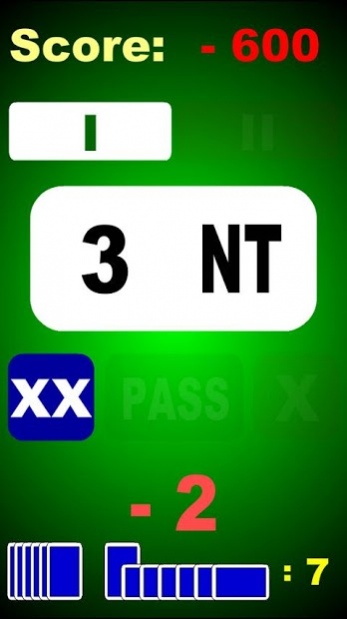

The Bridge Score Calculator displays any duplicate score possible. Simply Swipe and Tap your way to the contract and result desired!
The Bridge Score Calculator is easy to understand as design effort is made to make it look familiar to Bridge players all over the World.
It can be used for educational purposes as well as an analytical quick reference for professionals.
Requirements:
Adobe® AIR®
Android 2.2 and later
Both Tablets and mobile phones are supported.
Instructions:
Set Non Vulnerable/Vulerable by tapping the faded out button under the displayed score.
Set contract by swiping the contract level and/or the suit. (Up/Down or Left/Right)
Set XX, X, PASS by tapping the preferred faded out button not currently selected.
Set Tricks Taken by swiping the bottom area Up/Down or Left/Right.
Score for selected criteria is immediately displayed.
TURN OFF the application by clicking on the Menu button on your device. A gray Exit button will appear at the bottom. Tap it to close.
The Bridge Score Calculator always starts with a common "4 Hearts" contract to make it as easy as possible to get to any other desired contract.
About Bridge Score Calculator
The company that develops Bridge Score Calculator is Blue Starships. The latest version released by its developer is 1.0.0.
To install Bridge Score Calculator on your Android device, just click the green Continue To App button above to start the installation process. The app is listed on our website since 2011-09-08 and was downloaded 0 times. We have already checked if the download link is safe, however for your own protection we recommend that you scan the downloaded app with your antivirus. Your antivirus may detect the Bridge Score Calculator as malware as malware if the download link to air.BridgeScorer is broken.
How to install Bridge Score Calculator on your Android device:
- Click on the Continue To App button on our website. This will redirect you to Google Play.
- Once the Bridge Score Calculator is shown in the Google Play listing of your Android device, you can start its download and installation. Tap on the Install button located below the search bar and to the right of the app icon.
- A pop-up window with the permissions required by Bridge Score Calculator will be shown. Click on Accept to continue the process.
- Bridge Score Calculator will be downloaded onto your device, displaying a progress. Once the download completes, the installation will start and you'll get a notification after the installation is finished.
Program Details
System requirements
Download information
Pricing
Version History
version 1.0.0
posted on 2011-09-08
New App!
There is a limited free version available.
Disclaimer
Official Google Play Link
We do not host Bridge Score Calculator on our servers. We did not scan it for viruses, adware, spyware or other type of malware. This app is hosted by Google and passed their terms and conditions to be listed there. We recommend caution when installing it.
The Google Play link for Bridge Score Calculator is provided to you by apps112.com without any warranties, representations or guarantees of any kind, so access it at your own risk.
If you have questions regarding this particular app contact the publisher directly. For questions about the functionalities of apps112.com contact us.
